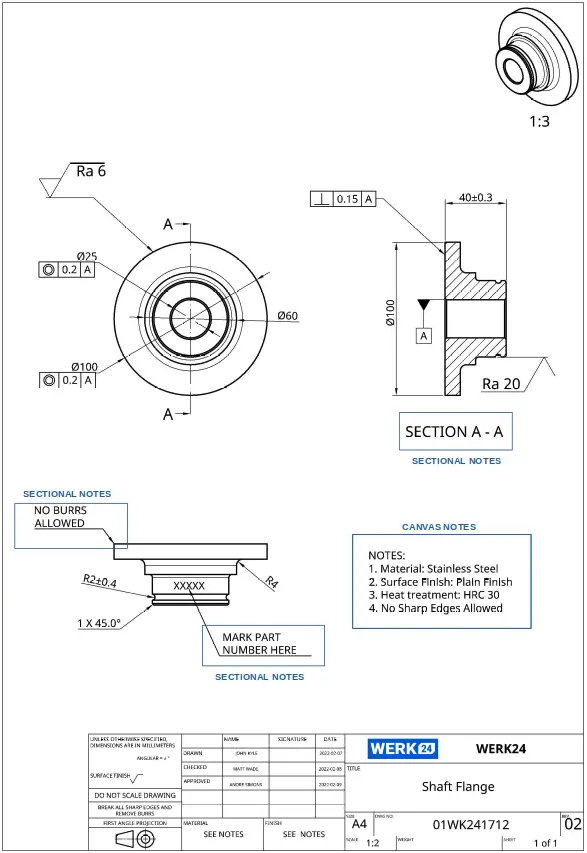
Canvas & Sectional Notes
Notes are the plain‑language rules of a technical drawing. They capture standards, defaults, exceptions, and one‑off requirements that don’t fit into dimensions or symbols. Understanding which notes apply globally and which apply locally is critical to avoid scrap and rework.
At a glance
- Canvas notes (aka General notes) apply to the entire drawing/part unless a more specific note overrides them.
- Sectional notes (aka Local/Specific notes, flag notes) apply to a specific feature, view, or region and typically include a leader or flag pointing at the feature.
- Precedence: Sectional > Canvas > Referenced standards (unless the drawing explicitly states otherwise with phrases like “U.N.O.” / “U.O.S.” — unless noted/otherwise specified).
Canvas Notes (General notes)
Also called General, Global, or Drawing notes.
Where they appear
- Usually in a numbered list near the title block or within the drawing field, outside the views.
- Often headed NOTES and formatted in uppercase for legibility. (Exact formatting varies by company standard.)
What they usually contain
- Standards & conventions used on the drawing (e.g., ASME/ISO series, default projection, units, decimal rules).
- Default tolerances for linear/angle dimensions or a reference like ISO 2768‑mK.
- Edge treatment defaults (e.g., “Break all sharp edges 0.2–0.5 mm.”).
- Surface finish defaults (e.g., “Unless otherwise specified, Ra 3.2 μm.”).
- Material treatments (e.g., heat treat, coating, anodize/plating, passivation).
- Company‑wide practices (e.g., deburr, rounding conventions, drawing interpretation rules).
Good examples
- 1) Unless otherwise specified (U.O.S.): Dimensions in mm; ISO 8015; ISO 2768‑mK.
- 2) Break all sharp edges 0.2–0.5 mm.
- 3) Surface finish U.O.S.: Ra 3.2 µm.
- 4) Anodize per MIL‑A‑8625 Type II, black.
Sectional Notes (Local/Specific notes)
Also called Specific, Local, or Flag notes.
Where they appear
- Adjacent to the relevant view/feature, usually with a leader line and arrowhead, or a flag/triangle that references a note number.
What they usually contain
- Feature‑level instructions: Thread callouts with depth, countersink/counterbore data, spotface sizes.
- Local overrides: Surface finish, edge break, radii/chamfers that differ from the default.
- Operations tied to a region: Ream/press‑fit instructions, weld symbols, gasket surface requirements.
- Part marking/engraving located at a specific face.
Good examples
- Ø10 H7 REAM TO DEPTH 15 (SEE SEC A‑A).
- M6 × 1‑6H THROUGH; C’SINK 90° × Ø12 FOR SCREW HEAD.
- THIS FACE ONLY: Ra 0.8 μm.
Reading order & conflicts (Rule of precedence)
- Sectional (local) notes override general defaults for the indicated feature/area.
- Canvas (general) notes set defaults for everything else.
- Referenced standards (ASME/ISO, company specs) apply when neither local nor general notes cover the case.
- Phrases like U.N.O. / U.O.S. signal that a statement is a default and can be superseded by more local notes.
Tip: If two local notes appear to conflict, the note closest to or most explicitly linked to the feature usually governs. When in doubt, request clarification.
Common pitfalls & how to avoid them
- Vague defaults (e.g., “Deburr” without amount): provide ranges (0.2–0.5 mm) or explicit specs.
- Buried exceptions: Don’t hide a one‑off requirement in general notes; attach a local note to the feature.
- Unstated tolerances: If you don’t cite a default tolerance class, add one to avoid assumption.
- Language/notation mixups: Be explicit about units and decimal separators.
Example (schematic)